
| |
| . |
Ultima Online House Editor UOHE ver 2.05
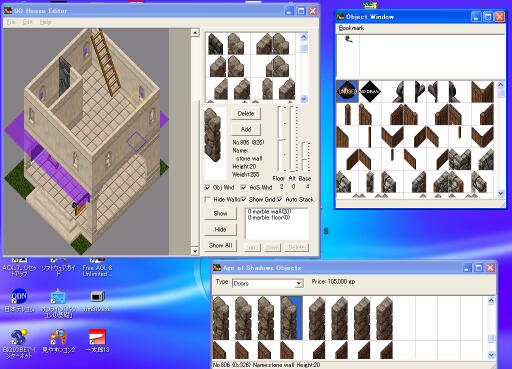
***EFFECT***
  This tool can edit and display houses used in Ultima Online.

  This tool is external to the Ultima Online program, it does not
  modify any part of the Ultima Online program.

  This tool is an aid in preparation for building a customized house,
  however it does not modify the Ultima Online program, or its data stream.

  Work will need to be redone within the game itself

***PROMISE***
  This program is Freeware. All rights reserved. You may distribute freely.

  However you may not modify or change any part of the program or associated
  file without first obtaining my permission. You must include the documentation
  with the program file in order to distribute.

  I'm not responsible and cannot be held reliable for any loss of data, corruption
  or damage that might occur by using this program. Use at your own risk.

  If you have any question, bugs, requests, send me a E-mail.
  * When communicating with me, my English is evolving, please bare with me.

***ARCHIVES***
  UOHE.EXE Program
  UOHE.TXT Document in Japanese
  UOHE_E.TXT Document in English(This file)
  BOOK_SYS.INI  Bookmarks(for systems)

***REQUIREMENTS***
  Windows 95, or later.

***INSTALL***
  Prior to running the program, Ultima Online needs to be installed.
  Please decompress files to any new directory.

***UNINSTALL***
  Only delete installed directory.
  ('uohe.ini' and 'bookmar.ini' are created to directory installed "uohe.exe". )
  ('UOHE' Does not modify the systems registry.)

***EDIT-IN IMMEDIATE MODE***
  You choose an object to place, and it can place by left-click.
  If it is a wall or a floor, you can place by left-dragging.
  You can delete by left-click, pushing a Shift key.
  The detail information on the appointed cell is acquirable by right-click.

***EDIT-IN OTHER MODE***
  Dragging the mouse pushing left button, can select arbitrary squares.
  Yellow square displays current altitude, Blue square displays base altitude.

  While selecting, to push the right button adds objects, to push the right
  button with Shift key delete objects.

***EDIT TOOL***
 -Delete button
  It can be used except Immediate mode.
  One object each is deleted from selected area.
  Deletion is performed in an order from a top.
  It is equal to a Shift key + right button.

 -Add button
  It can be used except Immediate mode.
  One object each is added tom selected area.
  Inserting on the way is impossible and it is always added to the top.
  It is equal to a right button.

 -Floor trackbar
  A class on display is shown.
  The bottom serves as ground quantity and the first floor of the second floor of the next serves as ....

 -Alt trackbar
  It can be used except Immediate and Replace mode.
  It sets up to set a object in the air.
  For example, if it is set as 10, an object will be directly put on an altitude 10.

 -Base trackbar
  The height of a foundation, the height of the first floor, is set up.

 -Obj Window checkbox
  Another window for object selection is opened.

 -AoS Window checkbox
  Another window which extracted the object used for house customize of 'Age of Shadows' is opened.

 -Edit mode
    -Immediate
      The almost same action as the house edit tool of Ultima Online is shown.
      Usage should look at the clause of "edit in Immediate mode."

    -Replace
      It is the mode for installing walls and floors.

      When installing a floor, even if something is already there, it is surely put on the bottom.
      In the case of a wall, on a floor, it is automatic and is overwritten.

    -Stack
      According to the height of an object, it accumulates automatically.

    -Insert
      Whatever may be there, it will be accumulated on the position set up with the Alt track bar.

 -Show button
  The thing under selection is returned to a visible state among the objects made into invisibility with the Hide button.

 -Hide button
  The objects under selection are made into invisibility.
  Please to edit the back of the object.

 -Show All button
  All invisible states are returned to a visible state.

 -Detail listbox
  The objects of the clicked grid are displayed.
  From the left, the height of the installed height, an object name, and an object is expressed.

 -Up button
 -Down button
  The altitude of the object under selection is changed.

 -Delete button
  The object under selection is deleted.

 -Zoom Dropdown list
  Display magnification is specified.


***OPTIONS***
 -Ultima Online Files
  The place of a file required for a tool is specified.
  Usually, since it is set up from the registry of Ultima Online, it is not necessary to edit.

 -Reload Paths
  Each file path of Ultima Online Files is re-initialized.

 -Base Size
  Footprint size in every direction is specified.

 -Object Window Stay on Top
  An object window will stay on top if it checks.

 -JPEG Compress Quality
  The quality of JPEG preservation is set up.
  If it becomes High and will be high-definition large file size and Low, it will become low quality-of-image smallness file size.

 -Clip Text Width
  The width per line of the text saved to a clipboard is specified.

 -Language
  A display language is specified.


***File MENU***
 -NewFile
  The document under edit is initialized.
  Moreover, initial setting of the foundation for Age of Shadow can be carried out.

 -Open, Save, SaveAs
  Reading of a document, preservation, and alias preservation are performed.

 -Image Save As
  A picture on display is saved by Bmp or Jpeg.

 -Load from Clip
  A file is read from a clipboard.
  If there is no lack, even if the domain to copy has a little excessive portion,
it is no problem.

 -Save to Clip
  A text file is outputted to a clipboard.
  Please use for the contribution to a bulletin board etc.

 -Import Multi
  The old building of Ultima Online is imported.

 -Exit
  A program is terminated.

***Edit MENU***
 -Undo
  The last operation is canceled.

 -Redo
  The last Undo is canceled.

 -Cut
  The selection range is cut off to a clipboard.

 -Copy
  The selection range is copied to a clipboard.

 -Paste
  It sticks from a clipboard.
  A start position consists of an upper left end of the range during selection now.

 -Delete
  One object each is deleted from a grid during selection.
  Deletion is performed in an order from a top.
  (It is synonymous with the Delete button)

 -Replace Walls
  The wall or stairs of a domain is transposed to the object kind of AoS window
  chosen now during selection.

 -Copy Image
  A picture on display is copied to a clipboard.

 -Option
  An option screen is displayed.


***View MENU***
 -Hide Walls
  Walls, the object of height 19 or 20, are made into invisibility.

 -Show Grid
  A grid is displayed.  It becomes effective when Floor is one or more.

 -Show Downstair walls
  The mark which shows the position of a downstairs wall is displayed on the floor of the present story.

 -Night Mode
  A light is displayed.

***Help MENU***
 -About
  The information about a tool is displayed.


***Page MENU (at Object window)***
 -Add
  A new page is added.

 -Rename
  The name of the page under selection (except for the main) is changed.

 -Delete
  The page under selection is deleted.

***Object MENU (at Object window)***
 -Add to
  The object under selection is added to the appointed page.

 -Delete
  The object under selection is deleted.

***Search MENU (at Object window)***
 -Find
  It searchs the specified name.

 -Find Next
  It searchs the next object.


***Type MENU (at AoS window) ***
  Tile type is set up.
  "Walls (Auto Fence)" is automatic and encloses the room.
  "Stairs (Auto Stack)" is automatic and is accumulated in the shape of stairs.


***Price Display (at AoS window) ***
  The starting expense is expressed when it customizes.
  However, the objects which cannot be used in AoS customize are also counted,
  it may become the display which is not right.


***x90% Button (at AoS window) ***
  90% of indicated price is set as a reference money setup.

***Reference money (at AoS window) ***
  The value which becomes the origin of difference is set up.


***KNOWN PROBLEM***
  Since light data has not been adjusted, a position, size, and a color may not
  be right.  If there is a wrong, please let me know with a BBS or etc.
  Since the bookmark of an object is seldom fixed, if the bookmark set which is
  easy to use is made, please announce by all means.
  ("lights", "weapons" or "armors")


***HISTORY***
  2002.12. 1  ver 1.00 Published

  2002.12.12  ver 1.01 Published
    The front display selection of an object window is possible.
    It automatic-size-chooses by Import.
    Bookmark of a tile is added.
    It is effectively about the Del key etc.
    Selection & copy paste
    Undo is added.
    It relates and starts by file Drag & Drop.
    Advanced vertical & deletion by the detailed window is possible.
   Jpeg quality change is possible.

  2003. 3. 2  ver 1.02 Published
    The dialog for Age of Shadows is added.
    A Eyedropper function is added by detailed window click.
    Anglicization of a resource, the addition of an English document

  2003. 3. 7  ver 1.03 Published
    A right button function is added.
    A display priority is changed.
    "Auto Fenc" and "Auto Stack" are added to the dialog for the Age of Shadows.
    A downstairs wall display is added.
    The check box of a display system is moved to the View menu.
    The bug out of which an error comes to paste is corrected.
    Differnce display is added to the price display.

  2003. 3.11  ver 1.04 Published
    It corrects immediately that an Auto Fence/Auto Stack function was not able to be used well.

  2003. 4. 6  ver 1.05 Published
    It corrects that the position of the Papua style walls with window and fences had shifted.
    Operation of a display system was returned to the check box from the View menu.

  2003. 7. 1  ver 2.00 Published
    A display system is changed into OpenGL.
    Most is renewed.

  2003. 7. 6  ver 2.01 Published
    '*.txt' is able to use for load and store.
    The text file for bulletin board contribution are added.

  2003. 7. 6  ver 2.02 Published
    Since the problem was in the run length processing portion, it is urgent correction.

  2003. 7.15  ver 2.03 Published
   The problem whose floor judging of the ground, a swamp, etc. was not completed is fixed.
   The problem which was not operating Auto Stack is fixed.
   Language selection (Japanese display) is added.
   It is variable about the text width for bulletin board contribution.

  2003. 8.14  ver 2.04 Published
    German messages are added.
    The problem on which deletion of a menu was not functioning is corrected.
    The editing mode selection method is changed into a radio button.
    An object selection function is deleted from a control window.
    The problem on which the display was confused in Immediate mode is corrected.

  2003. 8.17  ver 2.05 Published
    The problem from which the code of a bookmark had shifted is corrected.
| DOWNLOAD |
|---|
| uohe205.zip (349,893 bytes) |
| . |
